Why it matters
A bit of friendly competition makes it fun to keep recording, whether you ride with a club or drive the same commute as a friend. Ranking distance instead of speed keeps it safe.
Add friends.
Set up a profile with Sign in with Apple from the avatar in Statistics or in Settings → Account → Profile.
- Add friends by username or with a share link
- Up to 50 friends
- Pause sharing at any time
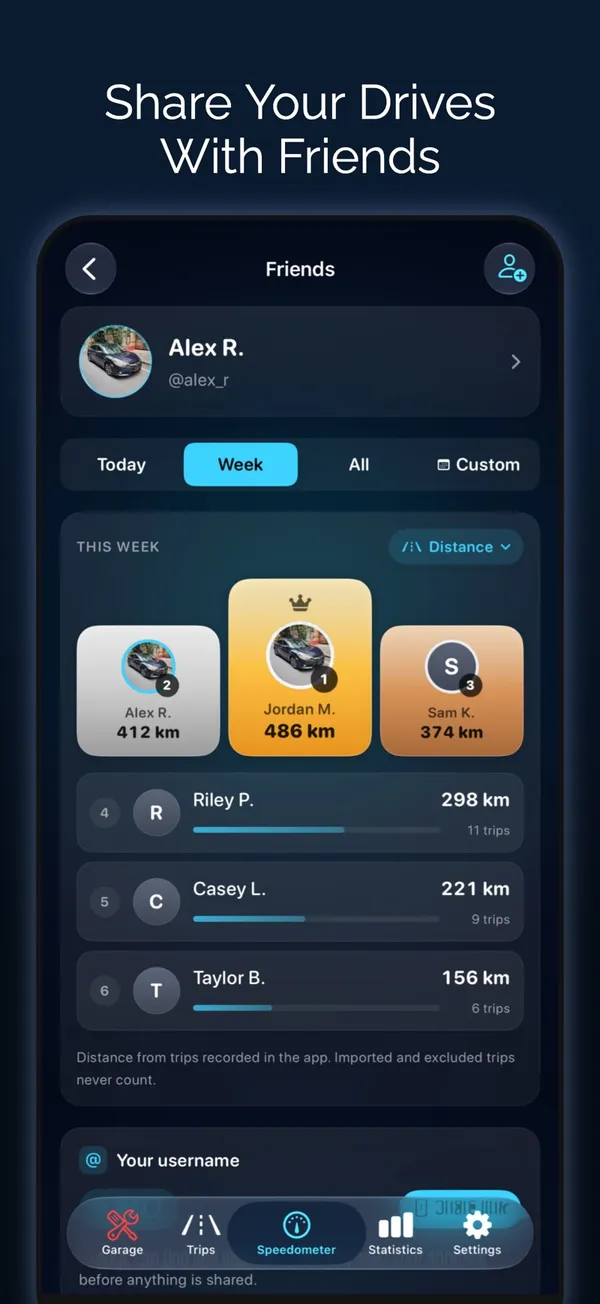
The leaderboard.
Boards rank you and your friends by what you choose.
- Distance, moving time or number of trips
- Trips count from 1 km or 3 minutes
- Imported and excluded trips never count
- Speed is never ranked or compared
What friends see.
Friends see daily totals, never where you drove.
- Distance, trips, time and elevation climbed per day
- Your longest drive and top speed, shown but not ranked
- No routes, places or locations
- Block, report, sign out or delete your Friends account
Questions about Friends and leaderboard
Can my friends see where I drive?
No. Friends see daily totals such as distance, trips and time. Routes, places and locations are never shared.
Is speed ranked on the leaderboard?
No. Boards rank distance, moving time or trips only. Speed is never ranked or compared.
Do I need an account?
Only for Friends. It uses Sign in with Apple. The rest of Odo works without any account.
Works well with
Convoy and Friends
One live map for your whole group, and a friendly distance leaderboard.
Learn moreSocial driving app
Track drives and rides, compare totals with friends and share the trips you choose.
Learn moreFor riders
Motorcycles, scooters, bicycles and e-bikes: ride tracking, gauges and routing built for two wheels.
Learn moreLast updated