Why it matters
A trip log shows where you went and how fast. Engine data shows how hard the car worked to get there: how much fuel the drive used, whether the engine ran hot, and when you were revving high.
An engine summary for each trip.
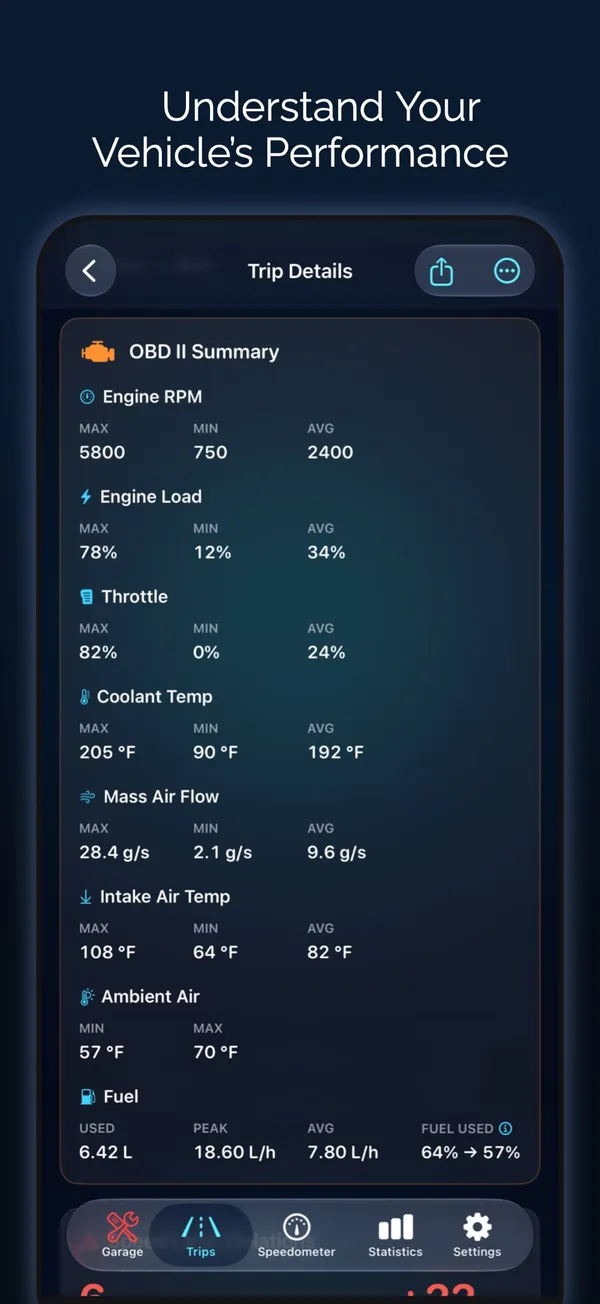
Open any trip recorded with an adapter and the OBD II Summary shows what the engine did from the moment the trip started.
- Engine RPM, engine load, absolute load and throttle: maximum, minimum and average
- Coolant temperature at the start and at its peak, oil temperature, intake and outside air
- Engine-on time and time spent above 5,500 rpm
- Peak boost from manifold pressure, and mass air flow
Fuel and cost per trip.
Odo works out how much fuel each trip used, from the car’s fuel rate or, when the car doesn’t report it, from airflow. It prices the trip from your last fill-up before it.
- Fuel used, peak and average fuel rate
- Average and best fuel economy
- Estimated cost from your fuel log
- Electric cars: state of charge at the start and end of the trip, once you add your car’s battery reading
Replay the engine in sync.
Channel Replay plays engine RPM, throttle, engine load and absolute load on one timeline with GPS speed, elevation and G-force. Move to any moment and every chart follows.
- One playhead across every chart
- Engine channels recorded every second
- Detailed recording is on by default and can be turned off
Faults caught on the way.
If the check-engine light comes on or a new trouble code appears during a drive, the trip records it.
- Check-engine events per trip
- New fault codes saved with the trip
- Engine data syncs with your trips through iCloud
- Export the summary or the second-by-second data
How to set it up
- 1
Set up your adapter once
Connect it from Garage → OBD II. Odo remembers it.
- 2
Drive
When a trip starts, by hand or automatically, Odo reconnects to the adapter and records.
- 3
Open the trip
Scroll to the OBD II Summary, or open Channel Replay to play the engine data back.
Only trips recorded with an adapter connected have engine data. Custom readings are shown live and aren’t saved with trips.
Guides
- How to record every trip automaticallyTwo ways to never miss a trip again: let Odo detect driving from motion, or have CarPlay, your car's Bluetooth or an NFC tag start recording. Step by step.
- How to connect an OBD2 scanner to your iPhoneWhich adapter to buy, where the port is, and the exact steps to connect a Bluetooth LE or Wi-Fi OBD2 adapter to your iPhone in under a minute.
Questions about OBD2 trip recording
Do I have to connect the OBD2 adapter before every trip?
No. After you set it up once in Garage → OBD II, Odo reconnects to the adapter whenever a trip starts, whether you start it by hand or automatically.
How often does Odo record engine data during a trip?
Every second. RPM, throttle, engine load and absolute load are recorded each second for Channel Replay, and each trip also saves an OBD II Summary with maximums, minimums and averages.
How does Odo work out fuel used if my car doesn't report fuel rate?
It estimates fuel from the engine's airflow (mass air flow), except on diesels. It then prices the trip from your last fill-up before it in your fuel log.
Will a trip show if the check engine light came on while I was driving?
Yes. If the check-engine light comes on or a new trouble code appears during a drive, the trip records it.
Does Odo record OBD2 data during trips?
Yes. With an adapter connected, each trip saves an engine summary, and RPM, throttle and load are recorded every second for replay. Full answer
Does my OBD2 data sync with iCloud?
Yes. Trip engine summaries and recordings, custom readings and each vehicle's engine data, including its code history, sync through your private iCloud account. Full answer
Can I export my OBD2 data?
Yes. Export trip engine summaries as CSV or PDF, a single trip second by second as CSV, a diagnostic report PDF, or each vehicle as JSON with Shortcuts. Full answer
Works well with
Export OBD2 data
Trip engine data as CSV or PDF, a diagnostic report and a Shortcuts action.
Learn moreRoute replay and analysis
3D route playback, replay videos, speed-colored routes, braking and G-force, stats and comparisons.
Learn moreFuel tracker
Scan the pump, auto-pick the station and get accurate full-to-full economy.
Learn moreLast updated