Why it matters
An alert in the moment is easy to miss. A report afterwards shows the patterns, such as the same stretch of road every day, so you can change the habit.
Every violation, graded.
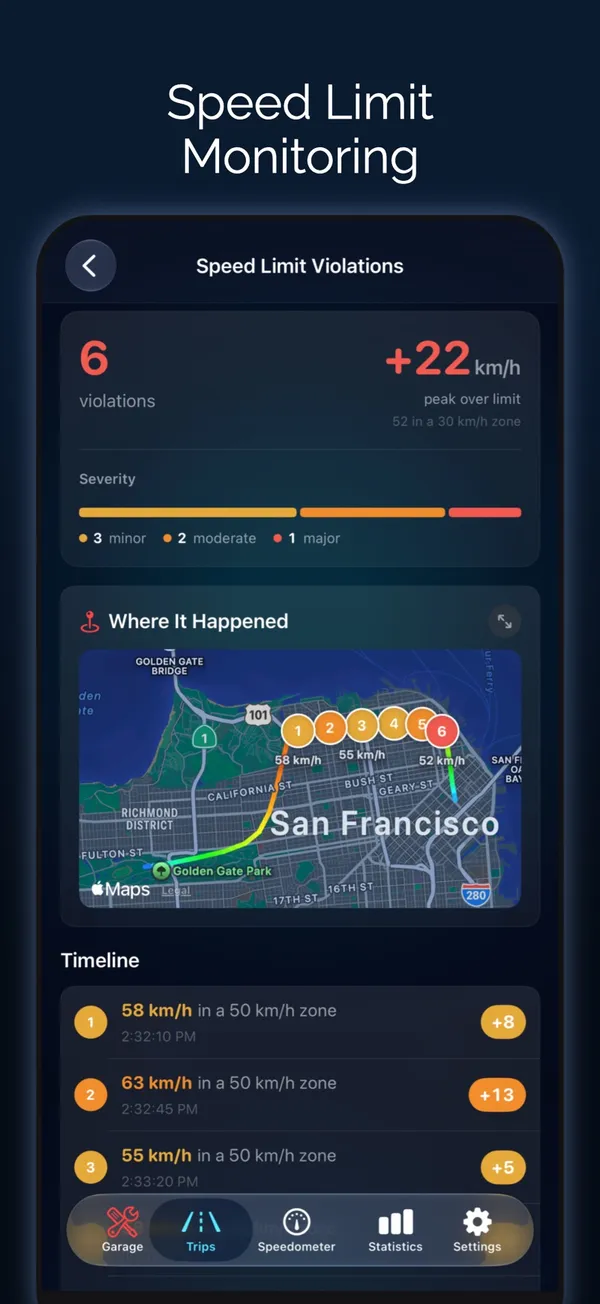
Each time the trip went over your limit is listed with how far over you were.
- Minor: under 10 over, in your display unit
- Moderate: 10 to 19 over
- Major: 20 or more over
- Total count, peak over the limit and the limit in force
Where and when.
See the places on a map and the moments on a timeline.
- Where It Happened map
- Timeline of the drive
- Clean stretches shown for each limit you used
- A Clean drive badge when there were none
Based on your limit.
The report measures against the limit you set in Odo, by hand, with presets, or with Siri.
- Up to 12 limit presets, from 20 to 300
- Change the limit mid-drive and the report follows it
- Pairs with alerts while you drive
Questions about Speeding report
Can I see where I was speeding on a trip?
Yes. Open the trip and scroll to Speed Limit Violations. It lists each time you went over your set limit, shows where on a map and when on a timeline.
Does Odo use posted road speed limits?
The report uses the limit you set in Odo. Change it as you drive, with a preset or with Siri, and the report follows. During navigation the posted limit sign is shown where map data has it.
What counts as minor, moderate or major?
Minor is under 10 over your limit, moderate 10 to 19 over, and major 20 or more, measured in the unit you display, km/h or mph.
Does Odo show speed limit alerts on CarPlay?
Yes. If you go over your speed limit for about a second, an alert appears on the CarPlay screen with buttons to raise or lower the limit. Full answer
Works well with
Speed limit alerts
Set your own limit and get a beep, vibration and red warning when you pass it.
Learn moreDriving log
A complete, searchable record of every trip, organized automatically.
Learn moreSpeedometer and HUD
50+ gauge designs, a mirrored windshield HUD, map mode and speed limit alerts.
Learn moreLast updated